
Last Updated on February 26, 2026
These days, businesses of all sizes often use QuickBooks to manage their operations and financial tasks. The application’s user interface is easy to navigate and helpful even if you’re just starting, but you may encounter errors at times. One such error is QuickBooks error 3030, which occurs in a situation when you are unable to sync the QB application to the company files. When this error appears, you may get an error message on your screens saying:
| “QB Sync Manager was unable to sync successfully”. |
This error occurs due to a company file issue in your system and a configuration problem. In this blog, we will discuss the methods you can use to tackle this error and sync your data without any hassle.
What Do You Understand By QuickBooks Error 3030?
Like every other software, QuickBooks should also be updated regularly to avail of new features and tools to boost your performance and save time. But you can notice issues arising from incorrect installation or problems with the company files. QuickBooks error 3030 occurs when you lose data or when the application is not syncing. This blog will discuss the steps you can take to resolve this issue in your system.
Some Key Factors Leading to QuickBooks Error 3030
Listed below are some reasons that cause error code 3030 in QB, which further cause issues while syncing company files.
- Your sync settings for the QBDT may be misconfigured.
- If you have a weak or unstable internet connection, it may cause a connection issue between QB and the Intuit Sync Manager.
- One cause could be that the QB program files are damaged or corrupted.
- You may have deleted the essential files required for syncing the company file.
- If the QuickBooks application installation is incomplete or damaged.
- When you are using the outdated version of QuickBooks Desktop.
These were the principal causes of QuickBooks error 3030 on your system.
Troubleshooting Methods to Overcome QuickBooks Error 3030
This section of the blog covers troubleshooting steps you can take to resolve error 3030 on your QuickBooks desktop when you try to sync company files.
Solution 1: Use an Alternate Method to Access the Company File
If you notice the QuickBooks 3030 error in your system, then you can try a different method to open the file in QuickBooks Desktop. Follow the steps below to do it without any hassle.
- Access your system
- Hold the Ctrl + Shift + Esc keys on the keyboard.
- Now, tap on the Processes tab.
- From the list of applications, find QuickBooks.
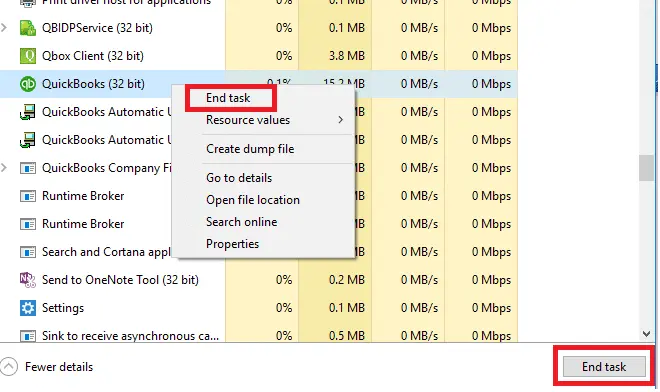
- Hover over the End Task option by right-clicking on the option.
- Press and hold the Ctrl key on the keyboard and double-tap on the QuickBooks logo.
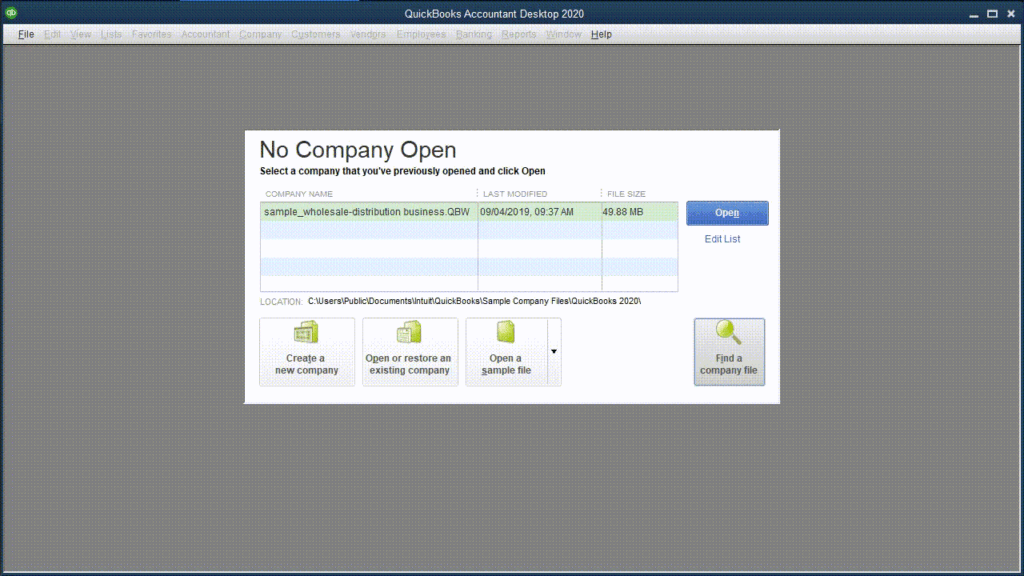
- Now, the No Company Open window will appear on the screen.
- Look for your company file name to access it.
- On the keyboard, press and hold down the Alt key.
- Then open the file.
- On the login screen, input the user ID and password.
- Hold down the Alt key until you see a blank screen.
The steps mentioned above will help you access the QBDT and the company file. If error 3030 persists, try repairing the application.
Solution 2: Repair the QuickBooks Desktop
You should check whether the QBDT application is experiencing any issues, as this might also cause error 3030. Follow the steps to repair it.
- Press the Windows key.
- Wait for the Start menu to open.
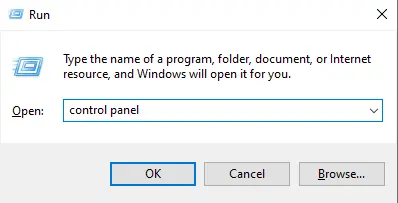
- Search for the Control Panel and launch it.
- Head to the Programs section.
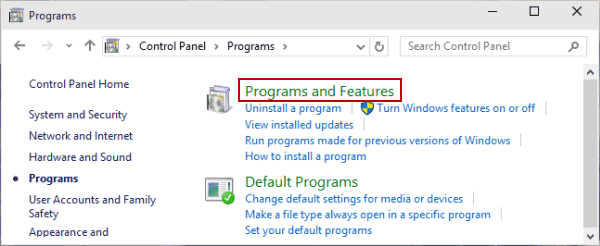
- Select Programs and Features.
- A list of applications will appear on the screen.
- Locate QuickBooks Desktop.
- Tap the Uninstall or Change option from the top.
- Choose to Repair or Remove.
- Follow the instructions on-screen.
- Exit the Control Panel.
- Lastly, restart your PC.
Now, try syncing the company file to see if the QuickBooks error 3030 still occurs.
Solution 3: Update the QB Desktop
The error can be seen in the system if an older version of QuickBooks Desktop is used.
You’ll need to upgrade to the latest version of QuickBooks Desktop and install the latest security patches and features. You can refer to the guide and carry out the steps to easily complete this procedure.
Solution 4: Use the Quick Fix my Program
You can use the Quick Fix my Program tool to fix the error.
- Get the latest version of QuickBooks Tool Hub.
- Now, run the tool hub.
- Go to the Program Problem section.
- Tap Quick Fix my Program in the menu.
You can also check the internet connection to see if it is not causing any issues.
Solution 5: Verify your Internet Connection
Check for connectivity issues in your system.
- Access the Microsoft application.
- Here, search for QuickBooks.com and hit Enter.
- Check whether the website is taking much longer to load.
These troubleshooting methods can help you fix error 3030 and sync your company files.
Conclusion
This blog covers QuickBooks error 3030, which may prevent you from syncing your company files with the application. There is a dedicated section that explains the reasons behind this error, helping you understand it. Moreover, we have created a troubleshooting guide to help you resolve this issue and get back to work. If you need any further help with your company files, contact our experts for a free consultation.
Frequently Asked Questions (FAQs)
How can I fix the QuickBooks error 3030?
When syncing your company files with QuickBooks, you may encounter error 3030. The methods to fix it can be updated to the latest version of QuickBooks to eliminate the risk of using an outdated version. You can also use Quick Fix my Program in the QB tool hub to resolve this error, or repair the QBDT application to fix it.
What do you understand by Intuit Sync Manager?
The Sync Manager is an application developed by Intuit to sync data from company files to QB Desktop. However, the sync manager application no longer exists because it was replaced by Web Connector, a better, more robust version of it, delivering new and broader features and benefits.
What are the potential culprits for sync error 3030 in QuickBooks?
If the sync settings are misconfigured, when the internet connection is unstable or poor, it may prevent you from establishing a connection between the sync manager and the QuickBooks application, or you may have damaged or corrupted company files, are the issues behind the QuickBooks error 3030.

Kate is a certified public accountant (CPA) with expertise in various accounting software. She is technically inclined and finds passion in helping businesses and self-employed people carry out bookkeeping, payroll, and taxation without worrying about errors. Every once in a while, Kate loves to travel to far-off places and relax in the lap of nature.